
编程语言
内容 · 1 编程语言的类型 o 1.1 高级别与低级别 o 1.2 声明式编程与执行式编程的比较 o 1.3 功能性与程序性 o 1.4 基于堆栈 o 1.5 面向对象 o 1.6 流量导向 · 2条规则 · 3 面向对象的编程 · 4个例子 o 4.1 Visual Basic的例子 o 4.2 Python的例子 o 4.3 C#实例 o 4.4 Haskell的例子 · 5个相关网页 编程语言是一种书面语言,它告诉计算机要做什么才能工作。编程语言是用来制作所有的计算机程序和计算…
内容
· 1 编程语言的类型
o 1.1 高级别与低级别
o 1.2 声明式编程与执行式编程的比较
o 1.3 功能性与程序性
o 1.4 基于堆栈
o 1.5 面向对象
o 1.6 流量导向
· 2条规则
· 3 面向对象的编程
· 4个例子
o 4.1 Visual Basic的例子
o 4.2 Python的例子
o 4.3 C#实例
o 4.4 Haskell的例子
· 5个相关网页
编程语言是一种书面语言,它告诉计算机要做什么才能工作。编程语言是用来制作所有的计算机程序和计算机软件的。编程语言就像计算机遵循的一套指令,让计算机去做某事。
程序员用编程语言编写源代码文本来创建程序。通常,编程语言的一些命令使用实词,这样的语言更容易被人类阅读。许多编程语言和普通语言一样使用标点符号。现在很多程序都是"编译"的。这意味着计算机将源代码翻译成另一种语言(如汇编语言或机器语言),这对计算机来说速度更快,更容易读懂,但对人来说就难读懂了。
计算机程序的编写必须非常谨慎。如果程序员犯了错误,或者程序试图做一些程序员没有设计好的事情,那么程序可能会"崩溃"或停止工作。当一个程序因为代码的编写方式而出现问题时,这被称为"bug"。一个非常小的错误可能会导致一个非常大的问题。
图片库
4 图片
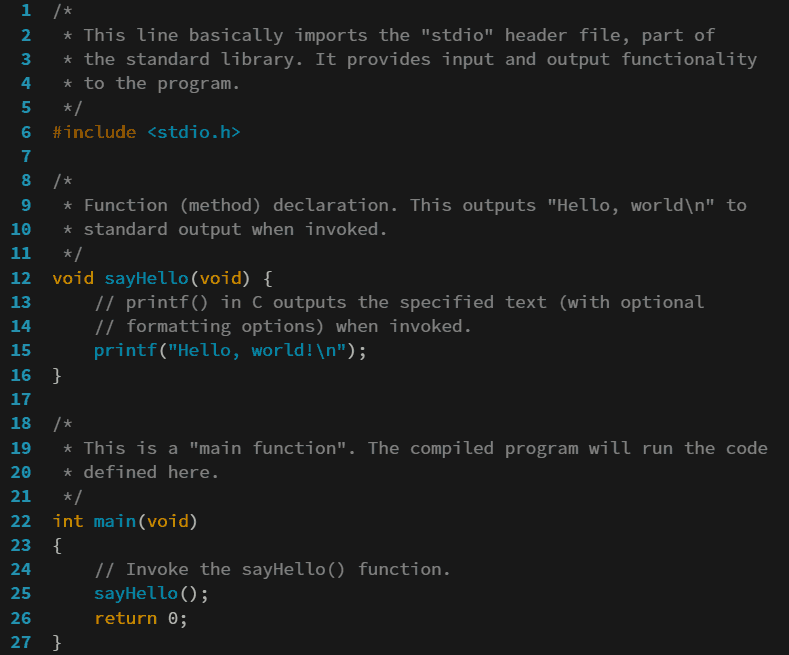


编程语言的类型
编程语言有很多类型。大多数编程语言并不单独遵循一种类型,所以很难为每种语言指定一种类型。下面每一节都给出了每种类型的例子,因为它们是该类型最著名的例子。
高级别与低级别
|
| 这一部分需要更多的信息。(2018年8月) |
![[icon]](https://www.alegsaonline.com/image/20px-Wiki_letter_w_cropped.svg.png)
与低级编程语言相比,高级编程语言对硬件知识的要求较低。高级编程语言需要一个解释器将源代码转换为低级编程语言。
声明式与执行式编程
声明式编程语言描述了一个"问题",但它们通常不说应该如何解决这个问题。问题描述使用逻辑,而"解决"问题通常看起来就像自动证明一个逻辑公理系统。这种编程语言的例子有Prolog、XSLT、LISP和SQL。
递进式编程语言描述的是一个状态变化的系统。在程序开始时,程序处于某种状态,并给计算机提供了遵循的步骤,以便执行一个动作。按照步骤进行操作,就会使程序"改变状态"。
一般来说,陈述式编程语言更安全、更简短。催促式编程语言更常见,因为它们更容易使用。
功能性与程序性
函数式编程把编程看成是数学中的函数。程序接收输入,连同一些信息,并利用这些信息来创建输出。它不会有中间的状态,也不会改变与计算无关的东西。
程序性程序规定或描述一组步骤或状态变化。
基于堆栈
基于堆栈的语言把程序的一些内存看成是一堆卡片。有很少的事情可以用堆栈来做。一个数据项可以放在堆栈的顶部。这种操作一般称为"推"。一个数据项可以从堆栈的顶部移除。这种操作叫做"pop"。你可以在不移除堆栈顶部的项目的情况下查看它。这叫做"窥视"。
如果一个程序写成"推5;推3;加;弹;",就会把5放在堆栈的最上面,把3放在5的上面,把上面的两个值相加(3+5=8),把3和5换成8,然后打印出最上面的(8)。基于堆栈的编程语言的例子有Postscript和Forth等语言。
面向对象
面向对象的编程语言将数据和改变数据的函数放入一个单一的单元。这个单位被称为"对象"。对象可以相互交互,并改变另一个对象的数据。这通常被称为封装或信息隐藏。大多数现代编程语言都是面向对象的,或者至少允许这种编程风格。这方面的例子有Java、Python、Ruby、C++、C#和其他C语言。
流程导向
面向流程的编程将编程看作是连接不同的组件。这些组件来回发送消息。一个组件可以成为不同"程序"的一部分,而不需要在内部进行更改。
规则
每一种编程语言都有关于它能做什么和不能做什么的规则。这些规则包括:
- 正确的数字(数字的种类,以及数字的大小)
- 词语(保留词语,大小写敏感)
- 对编程语言所能做到的限制
大多数语言都有官方标准,定义了如何编写源代码的规则。有些编程语言有两个或更多的标准。当一个新的标准取代一个旧的标准时,就会发生这种情况。例如,Perl 5标准在1993年取代了Perl 4。这可能是因为两个人同时制定了两个标准。例如,APL有几个标准。
面向对象的编程
面向对象编程(有时简称为OOP)是一种编程形式,程序的所有部分都是对象。对象是具有相同结构的内存片段,可以重复使用。一个银行账户、位图或视频游戏中的英雄都可以成为程序中的对象。对象是由属性(对象存储的信息)和方法组成的,方法是对象可以做的事情。一个Dog对象可能有高度和毛色等属性。它的方法可能包括bark()和wagTail()。
所有的对象都是由称为类的模板创建的。你可以把一个类看作是一个模具,从这个模具中制造对象。类定义了它的对象将拥有的所有属性和方法。从一个类创建的对象被称为该类的实例。一个类可以扩展另一个类,这意味着它可以使用类的所有属性和方法,但可以添加自己的属性和方法。
这里有一个例子,说明一个类在编程语言中可能是什么样子的。
class Dog extends Mammal { //这些是属性。 String breed = "Collie" String type = "Herding Dog" //这些是方法 void wagTail(){ // 做一些摇摆动作 } void bark(){ // 做这里 的叫声 }。}请注意,Dog类扩展了Mammal类,所以所有的狗都会有哺乳动物的属性,比如毛发长度(hairLength),以及方法,比如eat()或sleep()。
面向对象的编程被用于当今许多最流行的编程语言中,如Java、C#、Objective-C、C++、Python、Ruby、Javascript和ActionScript。
例子
Visual Basic的例子
这是一个用Visual Basic编写的简单程序。
这个程序会询问用户的年龄,并根据用户输入的内容进行回答。如果用户输入的不是数字,程序就会这么说。如果用户输入的数字小于零,程序就会这么说。如果用户说他或她的年龄大于100岁,程序就会说:"真老!"如果用户输入了一个正确的年龄,程序就会对用户回说他或她的年龄。
Python的例子
这里有一个程序,它和上面的程序做同样的事情,但是是用Python做的。
C#实例
和上面的程序一样,但用的是C#。
Haskell的例子
同样的事情,但在Haskell中。
相关网页
- 编程语言清单
- 程序员
- 编译器
- 计算机编程
问题与解答
问:什么是编程语言?
答:编程语言是一种书面语言,它告诉计算机该做什么。它就像一组指令,计算机按照这些指令去做某事,它通常对一些指令使用真实的文字,这样人类就更容易理解。
问:编程语言的例子有哪些?
答:编程语言的例子包括Python、Ruby、Java、JavaScript、C、C++和C#。
问:如何用编程语言编写程序?
答:程序是通过在编程语言的源代码中书写文字来编写的。通常也会使用标点符号。
问:用编程语言写完程序后会发生什么?
答:用编程语言编写程序后,必须进行编译,这意味着计算机将源代码修改或翻译成另一种计算机可以阅读的语言(如汇编或机器),但这种语言对人来说更难阅读。
问:如果编写程序时有错误,可能会发生什么?
答:如果在编写程序时犯了错误,或者程序试图做一些它没有设计的事情,那么它可能会停止工作,这被称为 "崩溃"。当这种情况发生时,由于代码的编写方式,它被称为 "错误"。即使是小错误也会导致大问题。
问:为什么计算机程序必须仔细编写?
答:计算机程序必须仔细编写,因为即使是小错误也会引起大问题,导致崩溃或bug。
相关文章
作者
AlegsaOnline.com 编程语言 Leandro Alegsa
URL: https://zh.alegsaonline.com/art/79378